
All templates / creative
Canvas resume template
Pro planEditorial creative composition with a restrained plum accent, photo, and clearly separated supporting information.
New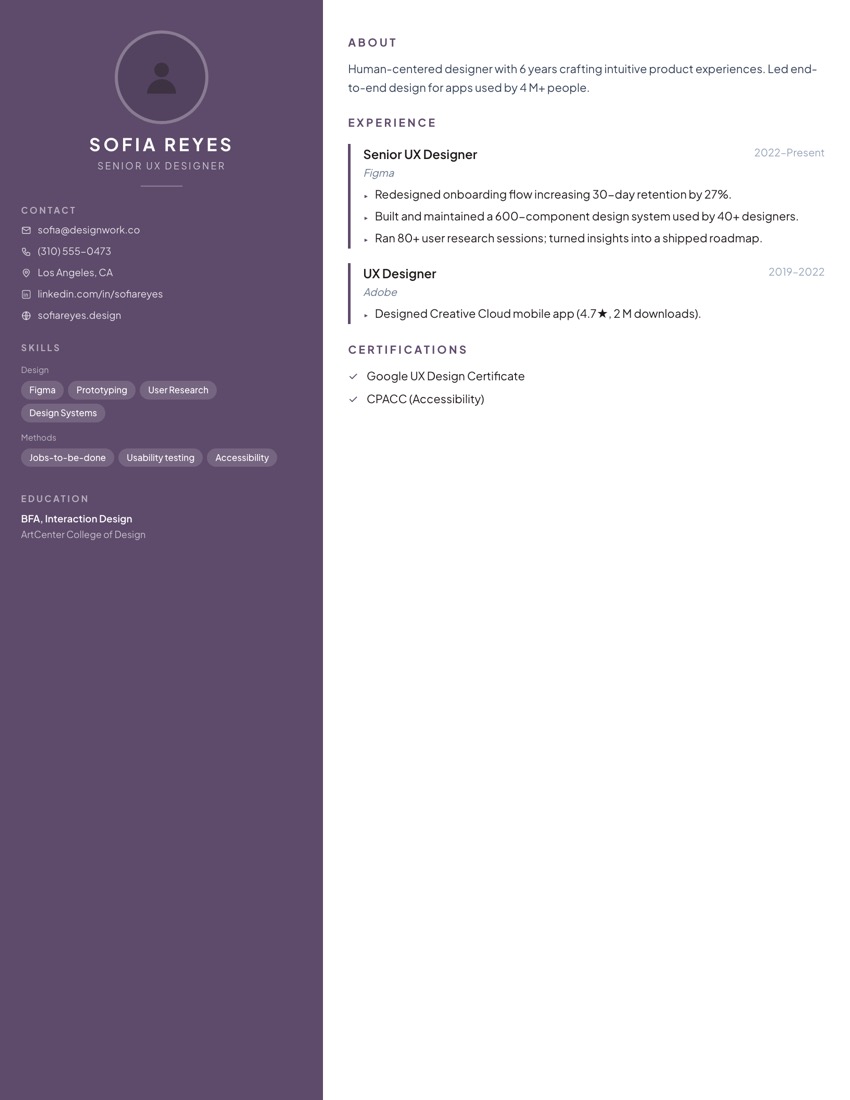
Best for
UX DesignerProduct DesignerUI DesignerCreative Director
Bolder styling that stands out — some conservative ATS-heavy employers may read that as less traditional, not as a plus.
What's included
- Asymmetric layout with a colored sidebar rail
- Photo placeholder
- Live color customization — not locked to the default palette
- PDF export (Pro plan)
- Word (.docx) export (Pro plan)
More creative templates
FAQ
- Is the Canvas template free?
- Canvas is on the Pro plan ($9/mo) — picking it takes you straight to checkout, there's no free trial of this specific template. Pro also adds Word export, AI tailoring, and more than 1 saved resume.
- Is it ATS-friendly?
- Yes — every template renders to a single reading order an ATS parser can follow (no tables, no text-in-images), regardless of how visually different they look. The free resume check verifies this on your actual content, not just the template.
- Can I change the colors after picking it?
- Yes. Color is a per-resume setting, independent of which template you picked — every template supports live recoloring in the editor.
- What if it doesn't fit after I start?
- Switching templates keeps your content — headings, bullets, dates all carry over. You're not locked into the first one you try.